
[How-To] Enterprise Wipe vs. Device Wipe vs. Unenroll vs. Delete Device in Workspace ONE UEM
Workspace ONE UEM provides several actions for removing management, corporate resources, or data from a device. Although Enterprise Wipe, Device Wipe, Unenroll, and Delete Device sound similar, they perform different functions.
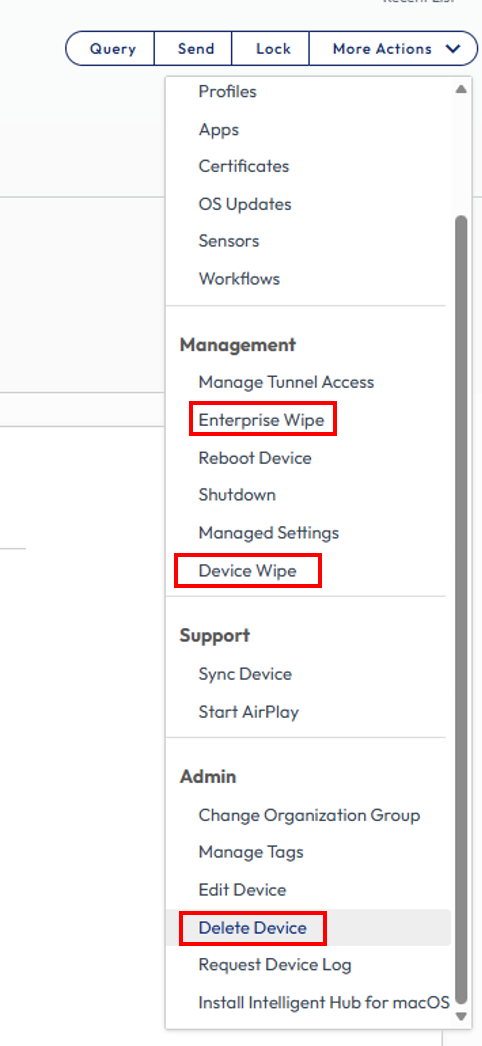
The exact behaviour can vary depending on the operating system, device ownership, enrollment method, management mode, application settings, and Workspace ONE UEM configuration.
Enterprise Wipe
An Enterprise Wipe unenrolls the device from Workspace ONE UEM and requests the removal of managed enterprise resources.
Depending on the platform and configuration, these resources can include:
- Configuration profiles
- Certificates
- Managed email accounts
- VPN and Wi-Fi configurations
- Managed content
- Enterprise applications configured for removal
- Other settings delivered through Workspace ONE UEM
An Enterprise Wipe is not a factory reset. Personal applications, photos, documents, user accounts, and operating-system settings are normally preserved.
Application removal can depend on settings such as Remove on Unenroll. Therefore, an Enterprise Wipe does not guarantee that every application previously deployed through Workspace ONE UEM is removed.
The device is no longer managed after the command is processed. However, the device record is not necessarily permanently deleted from the Workspace ONE UEM database and can remain visible with an unenrolled status.
An Enterprise Wipe is generally appropriate when corporate management must be removed without erasing the user’s personal data, particularly for personally owned devices.
Device Wipe
A Device Wipe sends a platform-specific command to erase the complete device and return it to a factory-reset or equivalent initial state.
Where supported, this removes:
- Corporate data
- Personal data
- Applications
- User accounts
- Files
- Device settings
- Workspace ONE management
A Device Wipe is destructive and normally cannot be reversed. Its availability and exact behaviour depend on the operating system, device model, ownership type, and enrollment mode.
A Device Wipe is generally intended for corporate-owned devices that are being reassigned, retired, disposed of, or remotely erased because they are lost or stolen.
A Device Wipe ends management but does not necessarily permanently delete the historical device record from Workspace ONE UEM. Deleting the record is a separate part of the Delete Device action.
Administrators should verify the device identity, ownership, enrollment type, and selected action before sending a Device Wipe.
Unenroll
Unenroll describes the process or resulting state in which a device is no longer enrolled in Workspace ONE UEM.
It is not necessarily a separate universal wipe command. A device can become unenrolled through different methods, including:
- An administrator performing an Enterprise Wipe
- An administrator using Delete Device
- A user selecting the unenrollment option in Workspace ONE Intelligent Hub
- A user removing device management where the operating system and company configuration permit it
Administrators can allow or prevent users from unenrolling through Workspace ONE Intelligent Hub.
Unenrollment normally removes the active management relationship. Managed resources are removed according to the operating system, enrollment method, and configured removal settings.
Because unenrollment is not a full factory reset, personal data is normally preserved. The device record can remain in Workspace ONE UEM with an unenrolled status until it is separately deleted.
Delete Device
Delete Device is not simply a harmless removal of an entry from the Workspace ONE UEM console.
When Delete Device is performed on an enrolled device, Workspace ONE UEM:
Initiates an Enterprise Wipe
Unenrolls the device
Permanently removes the device record from Workspace ONE UEM
Omnissa describes Delete Device as the least recoverable of these actions because it removes both the management relationship and the device record.
The Enterprise Wipe command is processed when the device communicates with Workspace ONE UEM. During this process, the console can display the device with the status Delete In Progress.
If the device is offline, powered off, unable to communicate with Workspace ONE UEM, or has already lost its management connection, the device-side removal cannot be guaranteed immediately. Corporate resources can remain on the device until the command is successfully received and processed.
Delete Device should therefore not be used as a routine database-cleanup action for an actively enrolled device.
Comparison
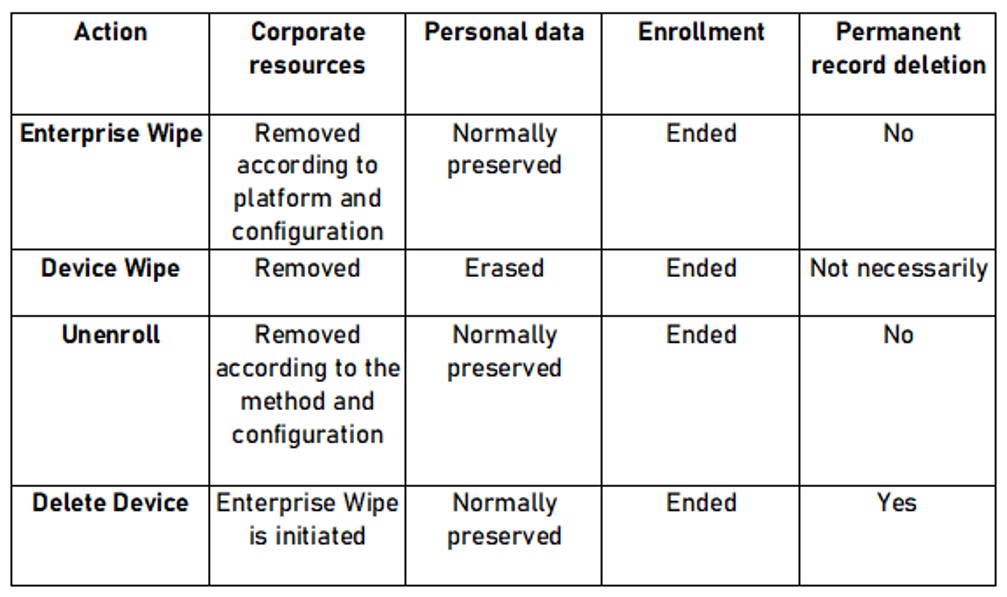
The removal of resources from the physical device requires the device to receive and process the corresponding command. Deleting the console record alone does not prove that the device successfully removed the corporate resources.
Next Steps
If you’ve read this far then chances are you are still having issues. Feel free to reach out to us. We’re happy to help out!





Leave a Reply