
[How-To] VLR Appliance 9.0.4 – HBR-Agent can’t be installed
Lieber Leser
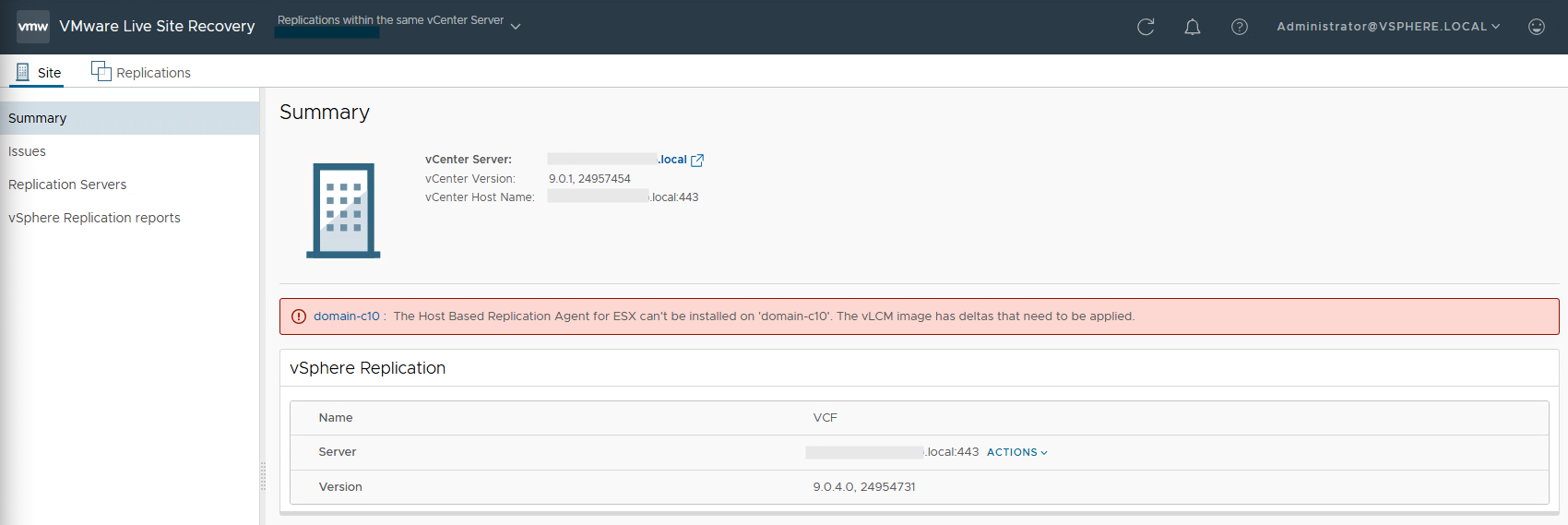
hast du gerade die VLR Appliance 9.0.4 installiert und kämpft mit der Fehlermeldung “The Host Based Replication Agent for ESX can’t be installed on ‘domain-cxx’. The vLCM image has deltas that need to be applied”?
Dann habe ich gute Nachrichten für dich. Sofern du einen vSAN Stretched Cluster hast, habe ich einen Workaround.
Die Lösung wird uns VMware mit VLR 9.1 liefern, hat mir VMware heute morgen bestätigt.
Die Ursache
Die Ursache liegt im vLCM begraben. Die Appliance erwartet nach dem Auto-Install der HBR Agents auf allen Hosts im Cluster eine Compliancemeldung, diese erfolgt nicht, da die Installation auf dem Witness Host, welcher ein Teil des logischen Gebildes ist nicht “compliant” meldet. Dies kann auch nicht manuell übersteuert werden.
Das offizielle Statement von VMware: “The issue is because vLCM is considering witness host as part of the cluster.
VLR is checking if hbr-agent is installed on the witness host or not. There is some delta reported by the vLCM cluster which is why we are not pushing the hbr-agent.”
Die Lösung
Einerseits wird mit 9.1 der HBR Agent Teil vom ESX-Image sein und somit der Auto-Install der VLR Appliance hinfällig. Andererseits wird im Code das Handling mit der Witness Appliance überarbeitet und der Fehler sollte nicht mehr auftreten.
Der Workaround
Um vorübergehend das konstante Compliance Checking zu umgehen, musst du auf der VLR Appliance den Auto-Install deaktivieren.
Per Putty auf die Appliance verbinden und dann
vi /opt/vmware/etc/hms/hms-configuration.xml
dann mit / nach folgenden Wert suchen
<hms-auto-install-hbragent-vib>true</hms-auto-install-hbragent-vib>
den Wert auf “false” anpassen und den Service neu starten
service hms restart
Hast du Probleme oder Fragen? – Dann melde dich bei uns!










Leave a Reply